

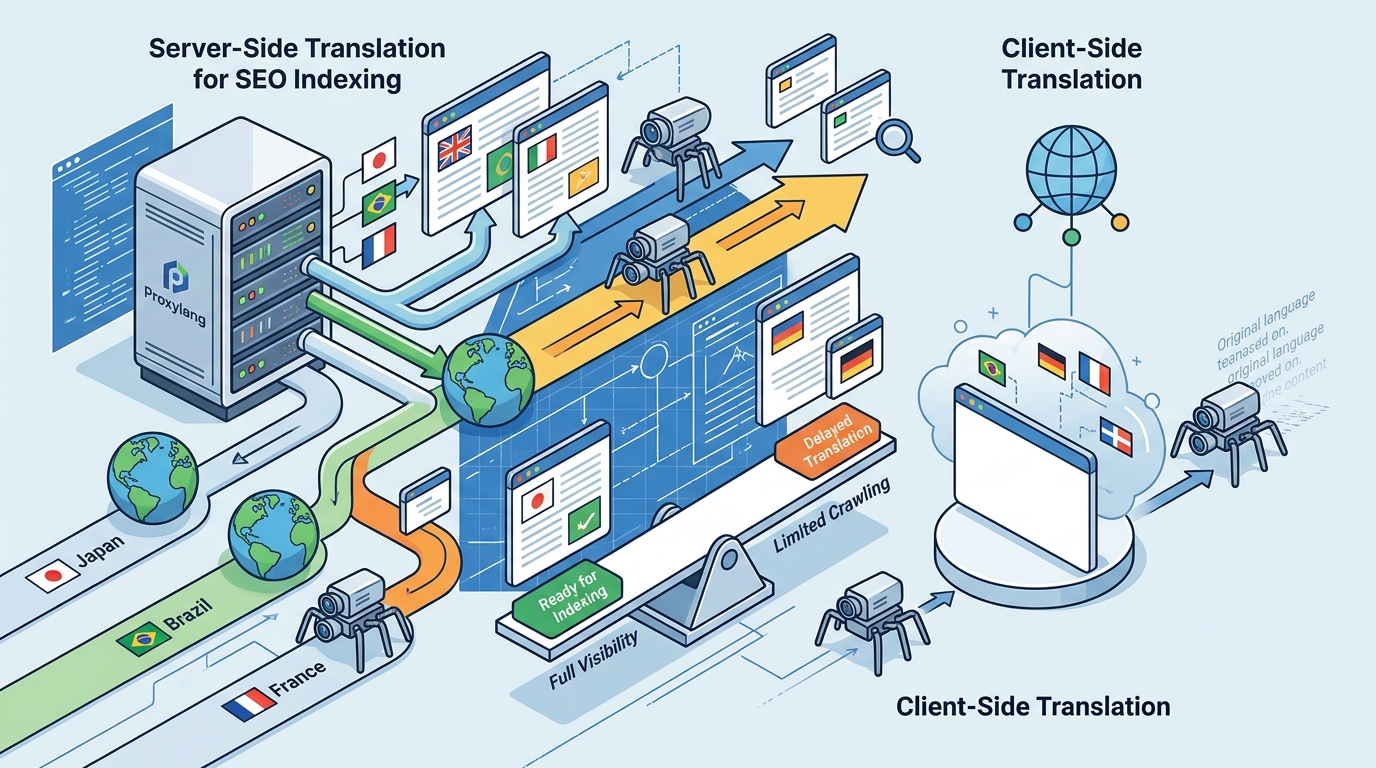
Server-side translation indexes better than client-side scripts because search engines receive fully rendered HTML at distinct URLs. Client-side scripts modify text in the browser after the initial page load, leaving crawlers with the original language. This guide explains how to choose, verify, and implement translation methods that drive organic traffic in 2026.
How to Choose a Translation Method
Choosing between server-side and client-side translation depends on your primary goal. If your goal is organic search visibility in foreign markets, server-side translation is the only reliable option. Client-side scripts are useful for user experience but do not create indexable pages. according to Index Translationum
The Indexing Requirement
Search engines like Google and Bing crawl websites by fetching HTML documents. When a crawler requests a page, it expects to find the final content in the HTML source. Client-side translation tools inject JavaScript that modifies the DOM after the page loads. Most search engine bots do not execute this JavaScript, so they see the original language. Server-side translation, often implemented via a proxy or pre-rendering, serves the translated HTML directly from the server. This ensures the crawler sees the target language immediately.
URL Structure Matters
Server-side translation typically uses distinct URL patterns, such as subdirectories (/es/, /fr/) or subdomains (es.example.com). These distinct URLs allow search engines to index each language version as a separate page. Client-side tools often use query parameters (?lang=es) or keep the same URL. Query parameters are generally ignored by search engines for indexing purposes, and keeping the same URL creates a conflict where the server sends one language but the browser displays another.
Questions to Ask Before Committing
Before selecting a translation provider, you must verify their technical implementation. Ask specific questions about how they handle server-side rendering and URL management.
Technical Implementation Questions
Ask the provider: "Do you serve translated HTML from your server, or do you use a client-side script?" If they use a script, ask: "Do you offer a hybrid mode or proxy that serves pre-rendered HTML to bots?" Many modern tools offer a hybrid approach where humans see the client-side widget for speed, but bots receive server-rendered HTML. This is the best of both worlds.
SEO Feature Questions
Inquire about hreflang tag generation. Does the tool automatically add and maintain hreflang tags for all language versions? Ask about sitemap generation. Does it create separate sitemaps for each language? Ask about IndexNow support. This protocol allows you to notify search engines of new or changed pages immediately, rather than waiting for the next crawl.
How to Verify Indexing Claims
Do not trust marketing claims about SEO benefits without verification. You can test any translation tool yourself using browser developer tools and search engine operators. according to Index Translationum
View Source Test
Open a translated page in your browser. Right-click and select "View Page Source." If you see the original language in the HTML source, the tool is using client-side translation. If you see the translated language in the source, it is server-side. This is the definitive test. Client-side tools will show the original text in the source, even if the browser displays the translation.
Search Engine Operator Test
Use the site: operator in Google. Search for site:yourdomain.com/es. If the tool is server-side, you should see Spanish pages in the results. If you only see English pages, the Spanish version is not indexed. You can also check the coverage report in Google Search Console to see if the translated URLs are being crawled and indexed.
How Server-Side Translation Works
Server-side translation involves a pipeline that intercepts requests, translates content, and serves the result. Understanding this pipeline helps you evaluate the speed and reliability of a tool.
The Proxy Model
Many server-side tools use a reverse proxy. Your domain points to the translation provider's servers. When a visitor or bot requests a page, the proxy fetches the original page from your server, translates the text, and returns the translated HTML. This process happens before the page reaches the browser. The result is cached at the edge, so subsequent requests are fast. This model requires no code changes on your site.
The Pre-Rendering Model
Some tools use pre-rendering. They crawl your site and generate static HTML files for each language. These files are served directly. This model is very fast but requires a build step whenever content changes. The proxy model is often preferred for dynamic sites because it translates content on the fly and caches the result.
Cost Drivers for Multilingual SEO
Translation costs vary based on the method, volume, and features. Understanding these drivers helps you budget accurately.
Word Count vs Page Views
Some tools charge by word count, others by page views. Word count is a one-time cost for each unique word. Page views are a recurring cost. For SEO, word count is often more predictable because you pay once for a translation and it is cached forever. Page view pricing can become expensive if your site gets high traffic. Check how the tool meters usage. Does it count crawler traffic? Do verified search engine crawlers use a different rate?
Feature Gating
Basic translation is often cheap. Advanced SEO features like hreflang tags, sitemaps, and proxy mode are often gated behind higher-tier plans. Ensure your plan includes the features you need for indexing. A cheap plan that only offers client-side scripts is not useful for SEO.
Common Mistakes to Avoid
Many businesses fail to get their translated sites indexed due to technical misconfigurations. Avoid these common pitfalls.
Ignoring hreflang Tags
Without hreflang tags, search engines may not understand the relationship between language versions. This can lead to duplicate content penalties or the wrong language being shown to users. Ensure your tool automatically generates and maintains these tags.
Blocking Crawlers
Check your robots.txt file. Ensure it does not block the translated paths. If you use subdirectories, make sure /es/ and /fr/ are not disallowed. Also, ensure your Content-Security-Policy does not block the translation script if you are using a hybrid approach.
Server-Side vs Client-Side Comparison
The table below summarizes the key differences between server-side and client-side translation for SEO purposes.
| Feature | Server-Side Translation | Client-Side Script |
|---|---|---|
| Indexing | Yes, fully indexable | No, not indexable |
| URL Structure | Distinct URLs (/es/) | Same URL or query params |
| Speed | Fast (cached) | Instant (client-side) |
| Setup Complexity | DNS or proxy change | One script tag |
| SEO Value | High | Low |
| Best For | Organic traffic | User experience only |
Translation for Specific Business Types
Different business types have different needs for multilingual SEO. Consider your specific context when choosing a method.
Ecommerce Stores
Ecommerce sites need product pages indexed in multiple languages. Server-side translation is essential here. A shopper in France searches in French. If your product pages are not indexed in French, you will not appear in their results. Client-side translation will not help you win these sales.
Content Sites
Blogs and news sites rely on long-tail keywords. Server-side translation allows you to rank for these keywords in multiple languages. The volume of content makes manual translation impractical, so an automated server-side tool is the only viable option.
Technical Rules and Protections
Search engines have specific rules for handling multilingual content. Understanding these rules ensures your implementation is compliant.
Canonical Tags
Use canonical tags to point to the original language version if you want to consolidate link equity. However, for SEO, you usually want each language version to be indexed separately. In this case, do not use canonical tags to point to the original. Let each language version stand on its own.
Language Hints
Use the Content-Language HTTP header to hint at the language of the page. This is especially important for Bing, which relies more on this header than hreflang tags. Ensure your server sends the correct header for each language version.
Regional Search Engine Specifics
Different regions have different search engines with different requirements. Tailor your strategy to your target markets.
North America and Europe
Google is the dominant search engine. It respects hreflang tags and indexes server-side translated pages well. Bing is the second engine and relies on Content-Language headers. Ensure your tool supports both signals.
Asia
Asia has multiple search engines with unique requirements. In Japan, Yahoo! Japan is a major player, but it runs on Google's index. This means if you are indexed by Google, you are likely indexed by Yahoo! Japan. In Korea, Naver is the dominant engine. Naver does not use Google's index and requires a separate registration and sitemap submission. Ensure your tool generates a Korean sitemap and supports Naver's specific requirements.
Timing Your Multilingual Launch
Timing your launch can impact how quickly you see results. Consider the following factors.
Content Volume
If you have a large site, it will take time for search engines to crawl and index all the translated pages. Start with your most important pages. Prioritize high-traffic and high-conversion pages. This ensures you see results quickly while the rest of the site is indexed.
Seasonality
Launch before peak seasons. If you sell holiday gifts, launch your translated site in the summer. This gives search engines time to index your pages before the holiday rush. Waiting until the last minute means you will miss the peak traffic window.
Long-Term SEO Results
Server-side translation provides long-term SEO benefits. Here is what to expect over time.
Initial Crawl Phase
In the first few weeks, search engines will crawl your new translated pages. You may see a spike in crawl activity. This is normal. Monitor your Search Console to ensure there are no errors.
Indexing and Ranking
After a few months, your translated pages should start ranking for relevant keywords. The speed of ranking depends on the competitiveness of the keywords and the authority of your domain. Patience is key. Do not expect overnight results.
Continuous Improvement
Translation quality improves over time. Some tools re-check live translations and fix weak sentences automatically. This continuous improvement ensures your content remains high-quality and relevant, which is a positive signal for search engines.
Key Takeaways
- Server-side translation is required for SEO indexing; client-side scripts are not indexable.
- Use distinct URLs for each language version to avoid duplicate content issues.
- Verify indexing by checking the page source and using search engine operators.
- Choose a tool that supports hreflang tags, sitemaps, and IndexNow.
- Consider regional search engine requirements, such as Naver in Korea.
- Start with high-priority pages to see results faster.
- Monitor your Search Console for crawl errors and indexing status.
- Plan for long-term indexing; results take months, not days.
Frequently Asked Questions
Can client-side translation ever be indexed?
No. Search engine bots do not execute JavaScript that modifies the DOM after the initial load. They see the original HTML. Only server-side translation, which serves translated HTML, is indexable.
What is the difference between hybrid and proxy mode?
Hybrid mode serves client-side scripts to humans for speed and server-side HTML to bots for indexing. Proxy mode serves server-side HTML to everyone. Hybrid is often preferred because it offers the best user experience and SEO.
Do I need to change my DNS for server-side translation?
It depends on the tool. Some tools use a reverse proxy that requires a DNS change. Others use a script tag that injects a server-side rendering service. Check the specific requirements of your chosen tool.
How long does it take for translated pages to be indexed?
It varies. Some pages may be indexed within days, while others may take months. Using IndexNow can speed up the process by notifying search engines immediately of new pages.
Can I use server-side translation with WordPress?
Yes. Many tools offer plugins or script tags that work with WordPress. The translation happens at the server level, so it is compatible with any CMS or custom-built site.
What happens if I exceed my word limit?
It depends on the tool. Some tools stop translating new content. Others serve the original language for new content. Check the provider's policy on exceeding limits. Proxylang, for example, keeps serving cached translations and shows the original language for new content until you upgrade.
Is machine translation good enough for SEO?
Yes, for most business content. Search engines value relevance and user satisfaction. If the translation is accurate and natural, it will rank. You can always edit specific strings in a live editor to improve quality.
Do I need a separate website for each language?
No. A single website with server-side translation is sufficient. You do not need to build and maintain separate sites for each language. This saves time and resources.
Conclusion
Server-side translation is the definitive solution for businesses seeking organic search visibility in international markets. By serving fully rendered HTML at distinct URLs, you ensure that search engines can crawl and index your content in every language. While client-side scripts offer a quick fix for user experience, they fail to deliver the long-term SEO value that server-side methods provide. Proxylang offers a robust solution that combines the speed of client-side widgets with the indexing power of server-side rendering. Their hybrid mode ensures that both humans and bots receive the best possible experience. To start your multilingual journey, visit Proxylang and see how easy it is to go global.